The short answer: If the trackpad stops clicking, the lid will not close, or the laptop rocks on a flat surface, this is not normal mechanical wear. The most likely cause is a swollen battery expanding underneath. Shut down the MacBook, disconnect the adapter, do not charge or press on it, and place it on a non-flammable surface. Take it to a repair shop as soon as possible; this condition will not improve on its own.
How to recognise a swollen battery
In MacBooks, the battery sits beneath the top case, directly under the palm rest, so the first symptoms are mechanical:
- the trackpad becomes stiff, stops clicking, or rises on its own — a battery cell is pressing against it from below,
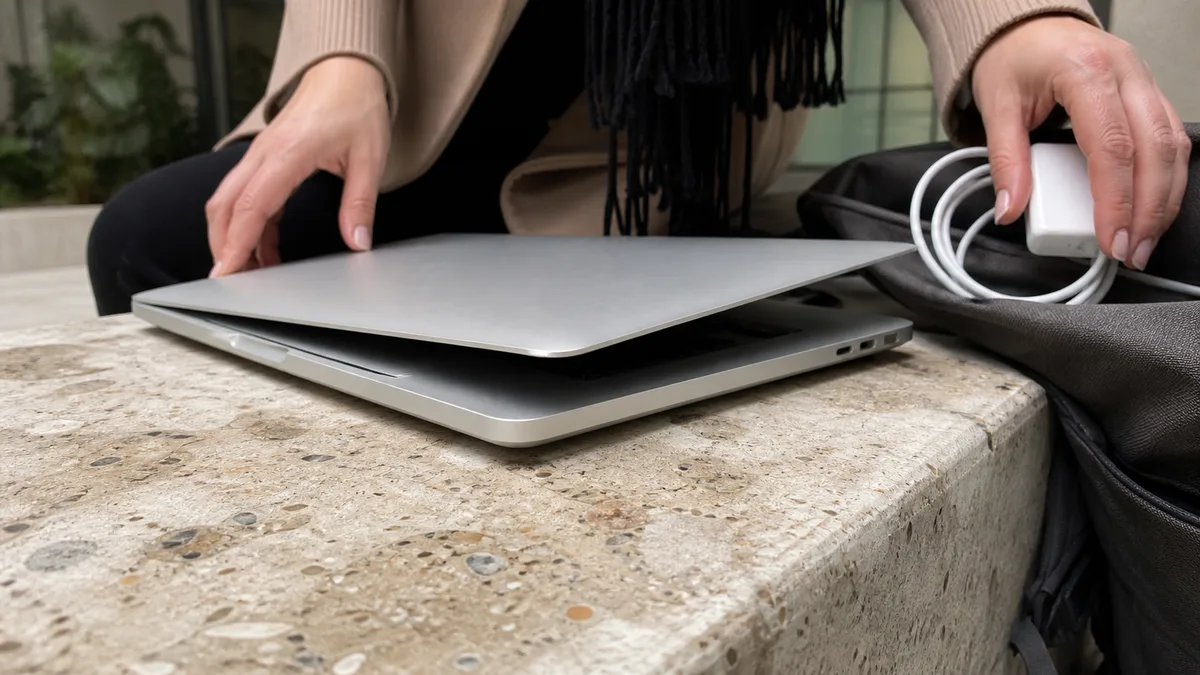
- the lid will not close fully, leaving a visible gap between the lid and chassis along one edge,
- the laptop rocks on a flat table and the bottom cover is no longer level,
- the bottom cover or top case begins to separate, and the screws are pushed out,
- part of the keyboard flexes or the keys offer uneven resistance.
A quick test: place the closed MacBook on a glass surface or another level surface and press down on its corners. Rocking and a gap along the edge of the lid are clear warning signs. If only the trackpad is raised while the chassis remains level, there may be another cause, but the battery should be the first suspect and must be checked before the trackpad mechanism.
Why this is not a cosmetic defect
A MacBook contains lithium-polymer cells in soft pouches. As the battery ages, is exposed to heat, or remains discharged or continuously full for long periods, its electrolyte breaks down and produces gases. The soft pouch cannot resist the pressure, so the cell expands and begins pressing against the components above it: the trackpad, keyboard, bottom cover, and, in some models, even the display.
There are two kinds of risk. A mechanically damaged cell can enter thermal runaway if it is charged again or punctured. Apple states in its safety instructions that a MacBook can be damaged by being dropped, burned, punctured, or crushed, and that a damaged device should not be used. At the same time, pressure from the battery damages nearby components, including the trackpad, the cables beneath it, the bottom cover, and screw threads. Within weeks, a repair involving one component can therefore turn into a repair involving three.
Heat accelerates the entire process. If your MacBook regularly runs hot, its cooling system is also worth investigating — see MacBook overheating.
What to do immediately
- Shut down the MacBook completely, holding the power button for about ten seconds if necessary.
- Disconnect the adapter and do not charge the MacBook again.
- Place it on a non-flammable surface — stone, sheet metal, or tile — not on a bed, carpet, sofa, or among papers.
- Do not leave it unattended, especially overnight, and do not put it in a bag with other items that could press against it.
- Carry it closed and flat, rather than holding it by the lid.
- Arrange a service appointment. Waiting for it to “stop being a problem” will not work, because the gas inside the cell cannot escape on its own.
What you must not do
Do not press the trackpad back into place or try to “compress” the battery. Do not puncture or drill into it, and do not attempt to release the gas. Do not put the MacBook in a freezer or leave it in direct sunlight. Do not charge it overnight. Never dispose of the battery with household waste. It must be taken to a collection point, and a swollen battery should only be handled by a repair shop or collection facility that has been informed of its condition. Do not remove it at home either; bonded MacBook battery cells require specific procedures and tools, particularly when they are swollen.
Battery health and cycle count matter, but not now
You can check the battery condition in macOS under System Settings → Battery, where the status may appear as Normal or Service Recommended. To find the cycle count, hold Option and select the Apple menu → System Information → Power. This information is useful when planning a battery replacement, but the numbers are irrelevant once a battery has swollen. A battery pressing against the chassis must be replaced even if its condition is listed as “Normal” and it has only two hundred cycles.
According to Apple, the following cycle-count limits apply:
| Model | Maximum cycle count according to Apple |
|---|---|
| MacBook Air M1 (2020), M2 (2022), M3 (2024), M4 (2025) | 1000 |
| MacBook Air Retina 13″ (2018–2020) and older 11″ and 13″ models (2010–2017) | 1000 |
| MacBook Pro 13″ M1 (2020) and M2 (2022), 14″ and 16″ (2021 and later) | 1000 |
| MacBook Pro 13″ and 15″ with Touch Bar (2016–2020) | 1000 |
| MacBook Air (Mid 2009) | 500 |
| MacBook 13″ Aluminum (Late 2008) | 500 |
Reaching the limit means that the battery is considered consumed, not that it will necessarily swell. For details on when replacement makes sense without acute swelling, see MacBook battery replacement.
What to bring to the repair shop
Provide the exact model and year, or the A-number printed on the bottom cover, and describe which part is rising and when you first noticed it. Bring the adapter you normally use. A photo of the gap around the lid or the bulge is helpful, as it can indicate in advance whether the trackpad and its cables may also have been damaged. Mention whether the computer has recently been transported in a car boot or left discharged for a long time. You do not need to provide your password or Apple Account details for an initial hardware assessment.
Servis PC Brno provides out-of-warranty MacBook diagnostics in a pilot programme and is not an Apple Authorised Service Provider. We determine the scope of work, part option, and price only after identifying the model and inspecting the device. If the device is under warranty or covered by a manufacturer programme, contact the retailer or Apple first. For an overview of other common faults, see MacBook repair in Brno.
A swollen battery is the one Apple service issue for which we say: “Do not wait for an available appointment — contact us immediately.” You can reach us through Apple service Brno, the booking form, or by calling 774 777 774. In your message, include the model, year, and the specific part of the computer that is rising.
Sources
- Apple: Important safety information for your Mac
- Apple: If you see “Service Recommended” for your Mac laptop battery
- Apple: Determine battery cycle count for Mac laptops
- Apple: Check the condition of your Mac laptop’s battery
- Apple: About battery health management in Mac laptops with Apple silicon
Rather not deal with it yourself?
Book a diagnosis in Brno — you get the price up front and we start only once you agree.
Where to find us
We are a PC and laptop repair shop in Brno-Židenice: diagnostics and repairs of computers and laptops, data recovery from drives, and out-of-warranty Apple repairs (iPhone 12 and newer, MacBook, iPad).
Viniční 3587/216, 615 00 Brno-Židenice, Czech Republic Mon–Fri 10:00–16:00
Call +420 774 777 774 Computer repair and laptop service in Brno
We put the repair price in writing after diagnostics and carry on only once you agree.