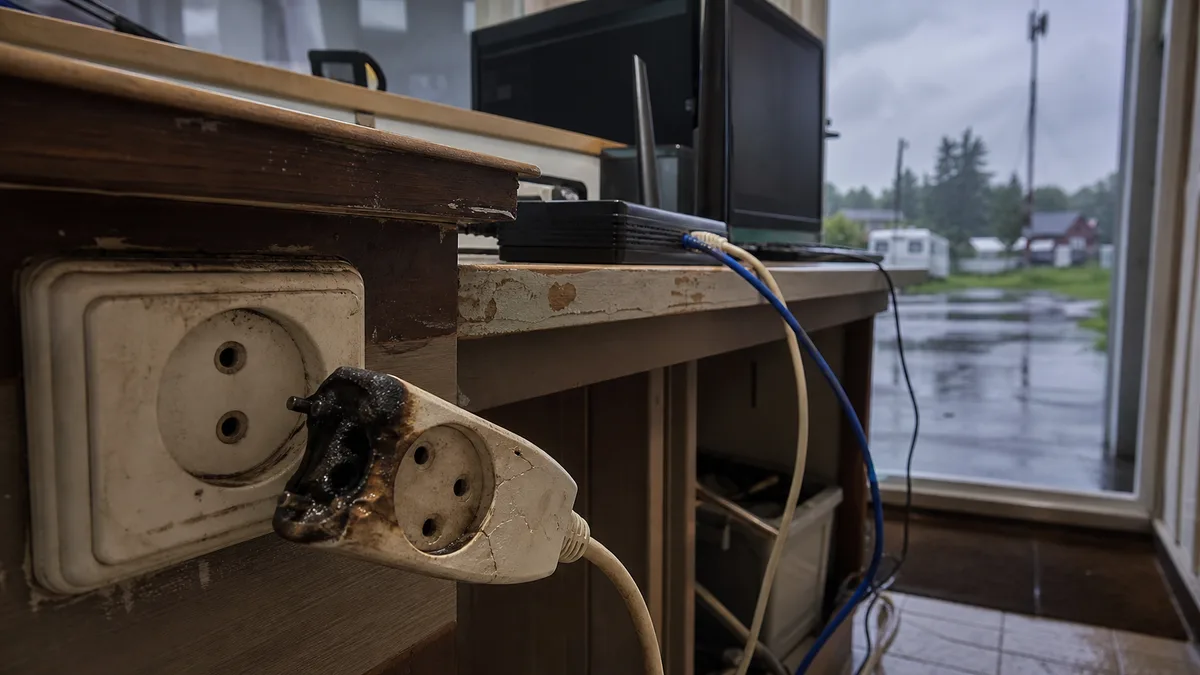
The short answer: After a storm, a damaged computer may appear dead, but “dead” can mean several different things, each pointing in a different direction. Before doing anything: do not try another adapter or power supply without testing first, do not repeatedly attempt to turn the machine on, and do not throw anything away—not even a burnt power strip or router. Photograph the connections, note the date and time of the outage, and wait until the equipment can be tested. The secondary damage we see in the workshop often happens during troubleshooting at home, not during the original surge.
How a power surge actually enters a computer
Most people expect only one route—the electrical outlet. In reality, there are three, and the second often comes as a surprise.
- 230 V mains supply. The classic scenario: a voltage spike reaches the power supply. In a desktop PC, it may destroy the power supply and sometimes the motherboard as well. In a laptop, it may damage the power adapter and the motherboard’s charging circuit.
- Data connection. Copper Ethernet running between buildings—a house and workshop, garage, pole-mounted camera or outdoor access point—as well as coaxial television wiring, antenna leads and older telephone or DSL lines. This route is easily overlooked.
- A potential difference between two circuits. The computer is plugged into one outlet and the monitor or switch into another. The surge finds a path through whatever connects them—in this case, a data cable.
With Ethernet, it is worth understanding what happens inside the computer. Near the RJ-45 connector is an isolation transformer designed to provide galvanic isolation for the line. An induced surge can jump across it, however, and the network adapter’s physical-layer circuit is next in line. In the vast majority of modern computers, this is not a removable card: it is a chip soldered to the motherboard—typically made by Realtek or Intel—or even integrated directly into the chipset. That is why a “burnt-out network card” becomes a motherboard-level fault.
A typical sign of a surge entering through the network is an RJ-45 port with no lights, a link that remains down even after trying another cable and switch port, or an adapter that has disappeared from Device Manager or appears there with an exclamation mark and still does not work after reinstalling the driver. Microsoft’s guide to troubleshooting Ethernet problems covers the software side of this diagnosis, including uninstalling the driver, restarting and resetting the network. If the adapter is still missing afterwards, the driver is not the problem.
“It looks dead” can mean five different things
Describe as precisely as possible which of the following situations applies. It determines the entire diagnostic process:
- Nothing happens. No indicator light, no fan and no click. In a desktop PC, the power supply is the most common cause; in a laptop, it is usually the adapter or the motherboard’s charging path.
- The indicator light comes on, but the computer does not boot. Power is present, but the initial hardware test does not complete.
- It starts and immediately turns off, or repeatedly cycles. Protection circuitry in the power supply or motherboard is shutting the system down because of a short circuit.
- It boots, but something is missing. The network adapter, some USB ports, audio, one memory slot or one display output. A surge can destroy just one specific circuit.
- It boots and runs, but crashes under load. This is the most deceptive scenario; see below.
The individual symptoms are covered in more detail in desktop PC won’t turn on and laptop won’t turn on. Faulty motherboard explains how to tell when the motherboard itself is the likely cause. After a storm, however, there is an additional consideration: you know that an event occurred which could have damaged several components at once, so the first fault you find may not be the only one.
What not to try now
- Another adapter or power supply without testing first. Connecting it to a shorted power rail may destroy the replacement as well.
- Repeated attempts to turn the machine on. Every further attempt drives current through the damaged circuit and can make the damage worse.
- Moving components between computers. The drive, memory or graphics card from the affected machine may itself be damaged and could harm a working computer.
- Taking things apart or throwing anything away. The power strip, router, adapter and defective components are both diagnostic evidence and supporting material for an insurance claim. Opening or modifying the equipment at home may also compromise its documentable condition.
A surge protector is not a lightning conductor
Surge protection devices in power strips and distribution boards are designed to absorb only a limited amount of energy and wear out over time. Every surge they absorb reduces their ability to handle the next one. The “protected” indicator on a power strip may remain lit because it only confirms continuity, not the condition of the protective components.
The second limitation is more fundamental: protection only covers the route on which it is installed. A surge arriving through Ethernet or coaxial cable bypasses it entirely, while a direct lightning strike on a building or outdoor line is in a completely different category from the mains voltage spikes an ordinary power strip is designed to handle. If copper Ethernet runs between buildings or to an outdoor camera, it presents an ongoing risk that should be addressed when designing the installation, not after damage has occurred.
Why damage may appear a week later
A surge does not always burn a component to a crisp—it may merely shorten its life. A degraded capacitor in the power supply, a weakened transistor or a damaged junction inside a chip may allow the computer to run for a while before it starts crashing, restarting by itself, losing USB devices or freezing. That is why you should record the date of the storm. If the computer begins behaving strangely two weeks later, that timing is relevant information, not necessarily a coincidence.
If the computer boots, Windows automatically records unexpected shutdowns and hardware errors. An unexpected restart is stored in the system log as a Kernel-Power event with ID 41, while hardware errors are reported by the WHEA-Logger source. These events are not diagnoses, but they provide a timeline—and that can be useful after a storm.
Decision table
| What you see after the storm | Most likely cause | Safe next step |
|---|---|---|
| desktop PC does not respond at all | power supply, possibly the motherboard as well | do not try another power supply; have it tested |
| laptop does not respond and the adapter light is off | adapter and possibly the motherboard’s charging circuit | do not connect another adapter |
| computer boots, but the network is missing | isolation circuit and network adapter on the motherboard | check Device Manager, then arrange diagnostics |
| computer boots, but crashes under load | partially damaged power supply or motherboard | back up the data and stop using the machine |
| router and other devices also failed | surge passed through the entire installation | document everything before repairs begin |
If you need to make an insurance claim
Your policy determines what the insurer will accept, and the repair shop has no say in that decision. The following steps are always helpful, including leaving the computer untouched until it has been inspected:
- Take photos before anything is dismantled: the workspace, connections, cables, burnt areas and product labels showing serial numbers.
- Do not throw anything away, including the burnt power strip, router and replaced components—the defective part may be the only physical evidence.
- List everything that failed at the time. A computer, router and television all failing simultaneously tells a different story from an isolated fault.
- Obtain a written service report describing the damage, not just a receipt for the repair.
Recovering data from the drive is a separate job from repairing the computer
This article is about computer repair. If the drive contains data that does not exist anywhere else, tell us as soon as you bring the machine in. Recovering data from damaged storage is separate specialist work for a data recovery laboratory, not part of the repair, and it changes the order in which the steps must be performed. Whether the computer is repairable and whether the data is accessible are not connected in the way people often assume, so this decision must be made at the beginning, not after the repair.
What to bring to the repair shop
Bring the entire computer, including its power cable and adapter; for a laptop, bring the original adapter as well. Tell us which of the five situations describes the machine, whether it was switched on when the surge occurred, how it was connected to the network—Wi-Fi or cable—and whether the Ethernet cable runs between buildings. Include the date and time of the storm or outage and a list of any other devices that stopped working.
We diagnose desktop PCs and laptops damaged by power surges in Brno by taking measurements on the actual device, not by estimating the fault from its symptoms. We cannot promise the scope or price of the repair in advance—we will confirm the diagnosis and price after inspection. Arrange an appointment through the booking form or call 774 777 774. In the description, explain exactly what the computer does and what other household equipment failed at the same time—it can cut the diagnostic work in half.
Sources
- Microsoft: Fix Ethernet connection problems in Windows
- Microsoft: Update drivers through Device Manager in Windows
- Microsoft: Troubleshoot unexpected Windows restarts and stop code errors
- Microsoft Learn: Event ID 41 — The system has rebooted without cleanly shutting down first
- Microsoft Learn: WHEA Hardware Error Events
Rather not deal with it yourself?
Book a diagnosis in Brno — you get the price up front and we start only once you agree.
Where to find us
We are a PC and laptop repair shop in Brno-Židenice: diagnostics and repairs of computers and laptops, data recovery from drives, and out-of-warranty Apple repairs (iPhone 12 and newer, MacBook, iPad).
Viniční 3587/216, 615 00 Brno-Židenice, Czech Republic Mon–Fri 10:00–16:00
Call +420 774 777 774 Computer repair and laptop service in Brno
We put the repair price in writing after diagnostics and carry on only once you agree.