“Do I have to buy an antivirus to go with this?” We hear that question with almost every computer we hand back. And honestly — the answer today is different than it was ten years ago.
Antivirus used to be more or less mandatory. The protection built into Windows was weak, and anyone running without one was asking for trouble. Today it’s more nuanced: the protection you get in Windows for free has caught up with the paid competition, and some well-known paid antivirus products have, on the contrary, made headlines for things that would make us think twice before recommending them. Let’s go through it honestly — no marketing, no scaremongering.
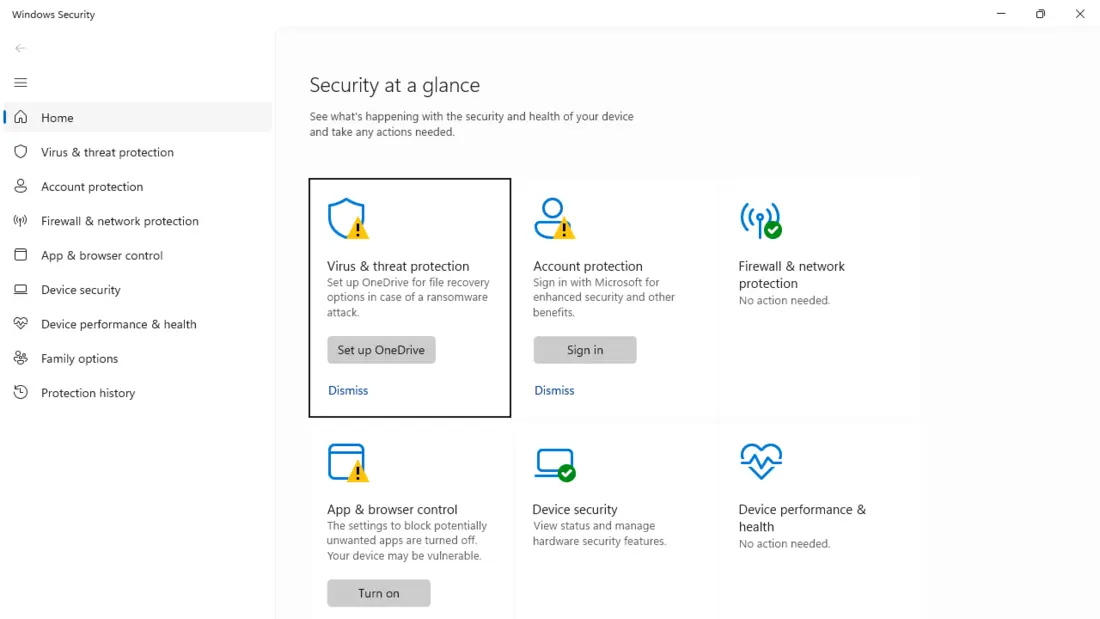
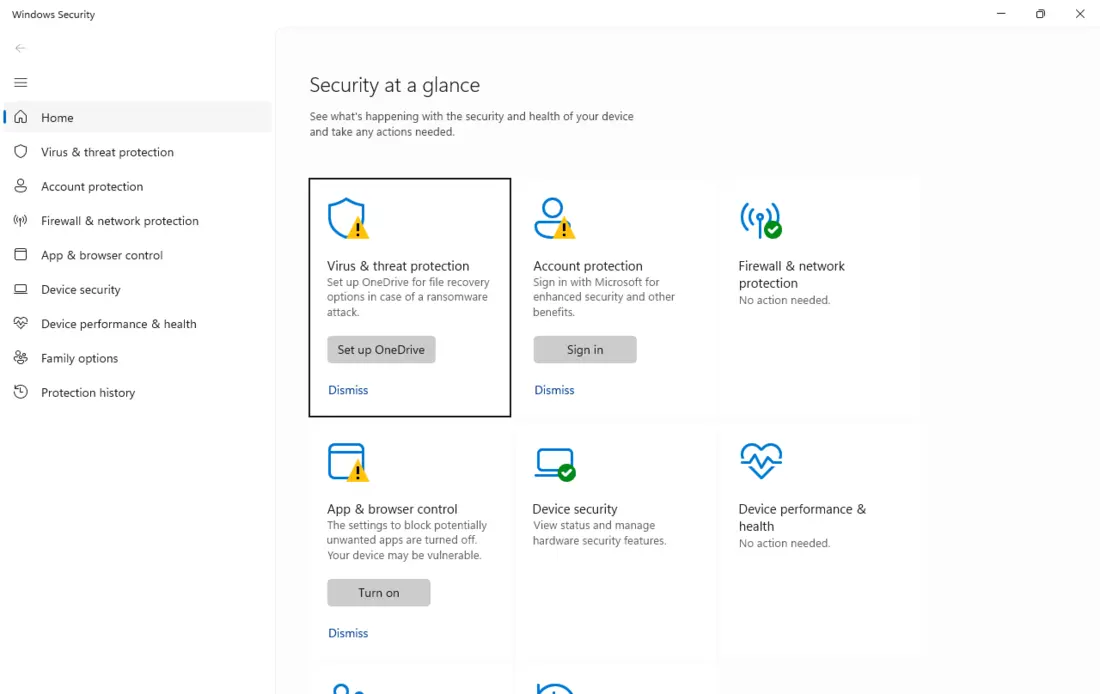
About the screenshots: they’re from an English install of Windows 11 (a test machine in our workshop). Windows occasionally renames things between versions, so take the labels as a guide.
The short answer
For most ordinary users — people who don’t browse dubious sites or download “cracks” — the answer is: the antivirus you already have in Windows, plus a bit of common sense, is enough today. You don’t need to buy any extra software.
That doesn’t mean antivirus is pointless or that there’s nothing to the paid ones. It depends on who’s sitting at the computer and what they do on it. Let’s take it in order.
What you already have in Windows 11 (and 10) for free
Windows has a built-in antivirus, Microsoft Defender — you’ll find it as the Windows Security app. It’s no placeholder: it’s a full antivirus that runs on its own, right after you install the system, with no payment and no sign-up.
And it’s not weak. In independent tests that antivirus vendors don’t pay for, Defender has been doing very well for years:
- In AV-TEST it repeatedly earns full protection marks and the “TOP PRODUCT” award — on par with the paid leaders.
- In the AV-Comparatives real-world protection test (Feb–May 2025) it blocked 99.1% of threats with only 2 false alarms — one of the lowest counts in the field.
What Defender does for free:
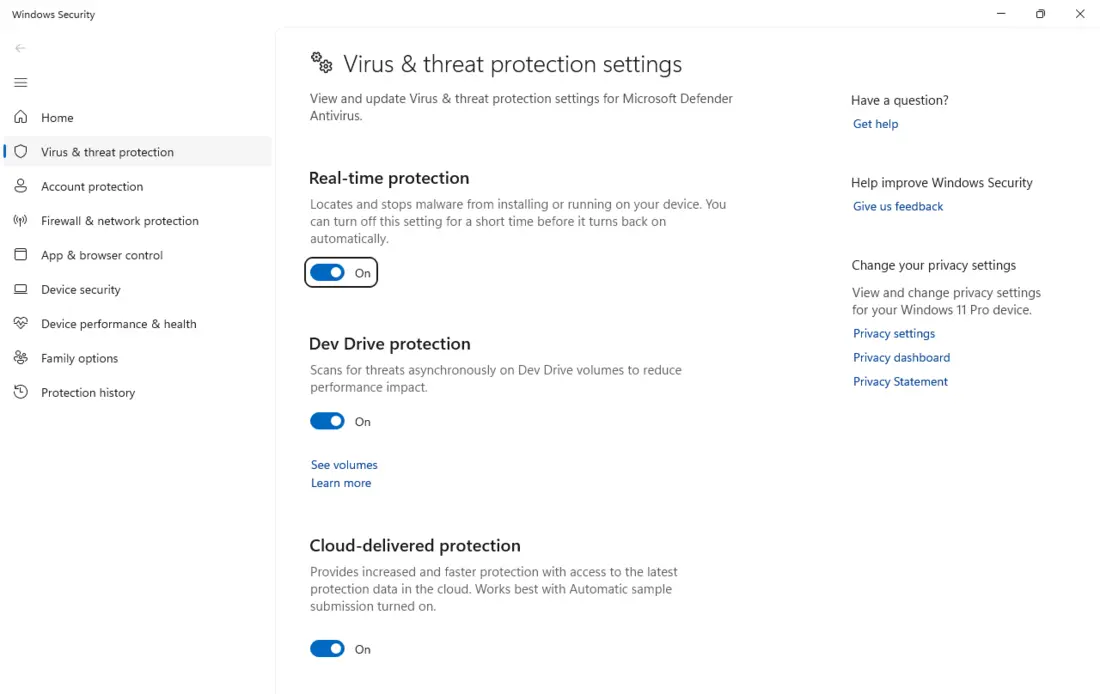
- Real-time protection — it watches files and processes continuously, not only during a manual scan.
- Cloud-delivered protection — it checks suspicious samples against Microsoft’s database within seconds, so it catches fresh threats too.
- SmartScreen — warns you about fraudulent sites and dangerous downloaded files.
- Firewall — Windows turns it on automatically and it blocks unsolicited incoming connections.
- Ransomware protection — so-called Controlled folder access, which you do have to switch on by hand (we cover how in Best antivirus 2026).
But it’s not all praise — Defender has gaps too, and as technicians we see them:
- It isn’t the lightest antivirus around. On an ordinary machine with an SSD you won’t feel it, but in AV-Comparatives’ detailed performance tests Defender is actually mid-pack — several paid products (McAfee, Norton, ESET, Kaspersky) load the system less. So that old line about “a paid antivirus will slow your PC down” doesn’t really hold any more.
- Its phishing protection works fully mainly in the Edge browser. In Chrome or Firefox you rely mostly on the browser’s own protection.
- It’s purely an antivirus — no VPN, password manager, parental controls or multi-device coverage (phone, Mac). Those come only with paid bundles.
So why do people still buy antivirus? And why it isn’t always a win
Sometimes a paid antivirus makes sense (we’ll get to that). But “paid = automatically safer” isn’t true. A few things that make us cautious about recommending some big names — all documented, not workshop gossip:
The antivirus that sold your data. Avast (and its AVG) spent years collecting users’ browsing history through its free antivirus and selling it on via the Jumpshot subsidiary. In the US, the FTC fined Avast $16.5 million and outright banned it from selling browsing data (2024). Here in the Czech Republic, the data-protection authority handed Avast a record fine of CZK 351 million. A court did overturn that fine in 2025 — but not because nothing happened: the court confirmed the unlawful data transfer itself; it only disagreed on how many people were affected (the authority counted about 100 million, Avast around 55), so the penalty has to be recalculated.
The antivirus that had to come off the machines. Kaspersky is technically good, but in 2024 the US banned its sale and from late September 2024 it stopped receiving updates in the US — citing Russian ties and the risk of misuse. US customers even had the software quietly swapped for a different product. European authorities have warned against it too. For a company that’s supposed to guard your computer, “you’re not allowed to use this” is a fairly serious label.
The antivirus that mined crypto on your PC. Norton added a “Norton Crypto” feature to its Norton 360 bundle that mined Ethereum in the background — and Norton took a 15% cut of what was mined. People found it hard to turn off and remove. After Ethereum switched to proof-of-stake, Norton shut the mining down in 2022 — but it left a bad taste.
Annoying renewals and “cancel it if you can figure out how”. Auto-renewal at a higher price, pop-ups pushing more and more services, awkward cancellation — we deal with this with customers all the time on the big brands (McAfee, Norton). It’s nothing new: both Symantec and McAfee have tangled with regulators in the past over opaque automatic renewals.
And finally: the antivirus itself can be the hole. An antivirus has deep rights in the system, so when it has a bug, the bug is in the most sensitive place. Researchers at Google Project Zero once found a critical flaw in Symantec/Norton antivirus that they described as “as bad as it gets” — the attack could be triggered just by delivering a file. And old hands remember how one McAfee update flagged a Windows system file as a virus and brought thousands of PCs down into endless reboots. The irony is that similar “false positives” occasionally hit Defender itself.
To be clear — we’re not saying every paid antivirus is bad. ESET and Bitdefender are solid, and in our antivirus comparison we recommend them for specific situations. Our point is this: paid doesn’t automatically mean safer, and free doesn’t mean worse.
What antivirus can’t do (so you don’t trust it blindly)
This is the most important part of the article. An antivirus protects your computer, not you. And most of the real messes we deal with in the shop don’t start with a classic virus:
- They start with phishing — a fraudulent email or page where the person themselves types in a password or confirms a payment.
- They start with the same password on ten sites — one leak and the attacker is in everywhere.
- They start with someone clicking “Run anyway” on a fake invoice attachment themselves.
No antivirus will save you from that. If you willingly type your password into a spoofed page or click past a warning, the antivirus shrugs — from its point of view, you wanted this. “100% protection” doesn’t exist, and anyone promising it is selling you a feeling, not safety.
How to stay safe even without (extra) antivirus — what actually works
Good news: the things that protect you the most are mostly free and don’t depend on which antivirus you have. This is what we advise everyone:
- Keep things updated — the system, the browser and your programs. The vast majority of successful attacks go through a hole that’s had a patch available for ages. Turn on automatic updates and that’s largely solved.
- Use a password manager and 2FA (two-factor authentication). A unique password for every site, plus a second step to confirm logins (a code, a key, a passkey), stops even the case where one password leaks. This protects you more than antivirus does today.
- Run an ad blocker. Fraudulent ads (so-called malvertising) are a common route to malware — even the FBI recommends using an ad blocker when searching the internet. A reliable, free one is uBlock Origin.
- Don’t run as administrator day to day. A lot of malicious code needs admin rights. If you use a standard account and don’t mindlessly click “Allow” on every prompt, you cut off a big share of attacks.
- Back up — the 3-2-1 rule. Three copies, two media, one off-site (ideally offline). This is the only real defence against ransomware: if your data lives elsewhere, the blackmail loses its point. We laid it out in The 3-2-1 backup rule.
- Download from official sources and read the warnings. Programs from the maker’s site, not the first ad link. And a simple rule applies: if you didn’t go looking for it, don’t install it.
Do these six things and you’re better off than someone with an expensive antivirus who clicks on everything.
What antivirus is genuinely good for today
So it doesn’t come across as if antivirus were useless — it still has its place. Today it works mainly as one layer in a broader defence:
- It catches the everyday “junk” off the internet — random, not-very-sophisticated malware, of which there’s plenty. Both Defender and the paid antivirus products handle this well.
- It watches behaviour, not just known viruses. When some process starts mass-encrypting files, a modern antivirus notices and stops it — even without knowing the specific virus. That’s valuable against ransomware and new threats.
- It checks your downloads and your USB stick. A layer you’d otherwise have to handle by hand.
- It’s good for the people who “click on everything”. An older relative, the kids, a less experienced family member — for them, always-on protection is a useful safety net. And paid bundles cover more devices at once (Windows, Mac, phone) and add a password manager, VPN or parental controls. If you’re dealing with those things anyway, a bundle can pay off.
In other words: antivirus yes, but as a supplement to the six habits above — not a replacement for them.
Check your Defender (step by step)
Whether you stick with Defender or have a paid antivirus, it’s worth confirming the protection is actually running. With Defender it takes just a few steps:
- Press the Windows key, type Windows Security, and open the app.
- On the left, click Virus & threat protection. Here you can see the result of the last scan and start a Quick scan.
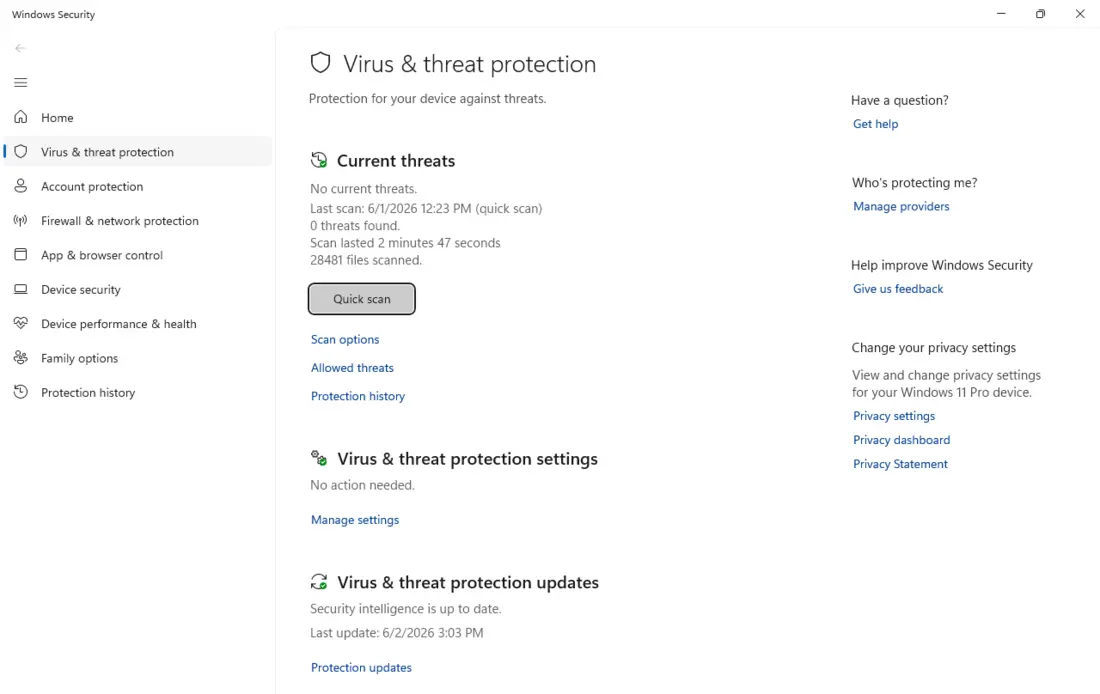
- Below that, click Manage settings in the protection-settings section and verify that Real-time protection and Cloud-delivered protection are on. After uninstalling another antivirus, protection is sometimes left off by mistake.
- If your main concern is ransomware, also turn on Controlled folder access and add your folders with documents and photos (covered in detail in the antivirus comparison).
And a rule that always holds: never run two antivirus products at once. They fight over control of files, and the result is usually a frozen, slow computer.
When you’re not sure
If you’re not sure your protection is working, whether “there’s something” on the computer, or the system is behaving strangely, you don’t have to figure it out alone. In our Brno workshop we clean up infected computers, recover data after ransomware and set up security that actually makes sense every day — no needless scaremongering and no overpriced bundles you don’t need.
Take a look at our Best antivirus 2026 comparison, or simply get in touch and we’ll advise you over the phone in five minutes.
Rather not deal with it yourself?
Book a diagnosis in Brno — you get the price up front and we start only once you agree.
Where to find us
We are a PC and laptop repair shop in Brno-Židenice: diagnostics and repairs of computers and laptops, data recovery from drives, and out-of-warranty Apple repairs (iPhone 12 and newer, MacBook, iPad).
Viniční 3587/216, 615 00 Brno-Židenice, Czech Republic Mon–Fri 10:00–16:00
Call +420 774 777 774 Computer repair and laptop service in Brno
We put the repair price in writing after diagnostics and carry on only once you agree.