The short answer: A squeaking or stiff hinge is not a cosmetic issue; it is an early warning that the plastic may crack. The repair is simplest while the lid merely squeaks. As soon as a bulge, gap, or crack appears near the hinge, stop opening and closing the laptop — every additional opening acts as a lever. Do not tighten the screws, apply glue, or wedge anything underneath. This article covers Windows laptops with plastic chassis; MacBook lids are covered in a separate guide: MacBook lid squeaks, does not close fully, or only stays open at certain angles.
How it starts: the hinge stiffens before the plastic cracks
A laptop hinge is not a freely rotating pivot like a door hinge. It is a mechanism with controlled friction, which allows the lid to remain at any angle instead of falling shut. Inside are lubricant and precisely fitted contact surfaces.
Years of use increase this friction: the lubricant dries out, dust gets inside, and corrosion develops on the shaft. The lid becomes harder to open, though it can still be moved. This is the heart of the problem: the force that used to rotate the hinge is now transferred to its mounting points. It loads the screws in the lid and the bottom case. A laptop that has been “a little stiff” to open for a year is gradually preparing the plastic to crack.
That is why a stiff hinge should not be ignored. This is the only stage at which the fault can be addressed before other parts are damaged.
Brass inserts: the plastic fails, not the screw
Threads in plastic laptop parts are not cut directly into the plastic. They are located in small brass inserts that are heat-pressed into mounting posts and held in place by ridges gripping the surrounding material. The screw is therefore anchored in brass, while the brass itself is held in the plastic only by friction.
When a seized hinge repeatedly loads this joint, the plastic around the insert begins to give way. Play develops first, then the screw starts spinning, and finally the insert tears out together with part of the mounting post. The progression is always the same:
- Squeaking and cracking noises, often only within one part of the opening range.
- The lid stops holding its angle, falls backwards, or closes by itself.
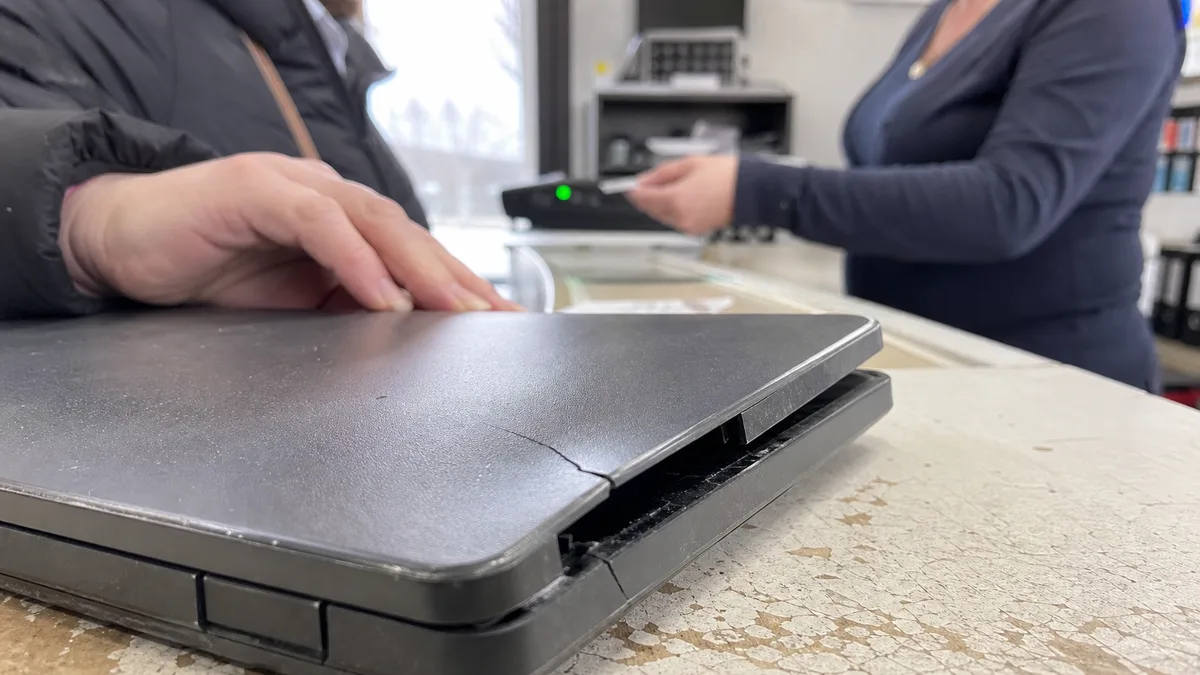
- The plastic near the hinge bulges, creating a gap between the display bezel and the lid.
- A crack extends from the hinge towards the corner, and a lifted corner is visible when the lid is closed.
- The hinge lifts part of the lid while opening and presses against the panel. At this point, it is no longer just a hinge problem but a display problem.
This most often affects mid-range plastic models such as Lenovo IdeaPad, HP Pavilion, Acer Aspire, and Dell Inspiron, particularly thin designs with little room around the mounting posts. It occurs less frequently in metal chassis and machines with more robust frames, such as ThinkPad, EliteBook, and Latitude models, but they are not entirely immune.
Display and antenna cables run through the hinge area
The hinge area carries more than mechanical components. The display cable, backlight power cable, camera and microphone cables, and, in the vast majority of laptops, coaxial Wi-Fi antenna cables all pass through it because the antennas are concealed inside the lid bezel.
In practice, this has two consequences. First, a hinge fault can appear to be a display fault: the image may flicker at a particular angle, the backlight may go out when the lid is tilted back, or lines may appear on the screen. Before blaming the hinge, check the software side; Microsoft provides its own procedures for both flickering and blank screens. The causes of these symptoms and the situations in which the panel genuinely needs replacement are explained in a cracked or flickering laptop display. Second, the problem may also cause intermittent Wi-Fi if an antenna cable becomes pinched.
This leads to one clear recommendation: do not move the lid back and forth in an attempt to locate the fault. Every cycle creates another bend precisely where the material is under the greatest stress.
Why you should not tighten, glue, or wedge it
Three pieces of online advice that end up costing the most money:
“Just tighten the screws.” A screw that spins is turning inside a loose insert, and tightening it will only finish tearing the insert out. If the plastic is already cracked, tightening the screw will spread the crack further.
“I’ll put a drop of superglue on it.” Cyanoacrylate creates a hard, brittle bond. A hinge is subjected to torsional stress, which will tear the bond apart during one of the first few openings, usually taking another piece of plastic with it. The fumes can also leave white marks on the surrounding material and readily cloud the display surface. A glued part is then harder to repair than one that has not been glued because a new insert cannot be fitted properly.
“I’ll wedge something underneath so it closes properly.” A spacer under the edge of the lid transfers pressure precisely where the panel cannot withstand it. Pressure can crack a display just as reliably as a fall, only more quietly and after a delay of several days.
One more bad habit: do not open the laptop by one corner. Opening it one-handed from the corner twists the entire assembly and accelerates cracking in machines that already have play in the hinges. Open it from the centre of the front edge while holding the bottom section with your other hand.
Decision table
| What you see or hear | What it usually means in a plastic laptop | What to do immediately |
|---|---|---|
| it squeaks but holds its angle and closes fully | dried lubricant, increasing friction in the hinge | have it disassembled and lubricated; do not tighten it |
| it is stiff to open and then suddenly gives way | uneven resistance; the mounting points are already loosening | minimise opening and arrange an inspection |
| the lid does not hold its angle | worn hinge mechanism | address it before the plastic gives way |
| the plastic bulges near the hinge | loose or torn-out brass inserts | do not open the laptop or apply glue |
| a crack runs from the hinge towards the corner | torn-out mounting post, damaged lid component | stop using it and bring it in for inspection |
| the image disappears at a particular angle | cabling routed through the hinge area | stop moving the lid |
| Wi-Fi drops out after opening the lid | pinched antenna cable | do not force the lid closed; arrange diagnostics |
| the laptop does not sleep when closed | the lid is not closing properly, or the power settings are incorrect | check the settings first, then inspect how the lid seats |
The final row deserves some clarification: Windows power settings determine what happens when the lid is closed, and an update may change or disrupt them. Check the software settings first and only then suspect a mechanical fault.
How it is repaired
The repair depends on how much sound material remains around the mounting posts:
- Rebuilding the mounting points. The hinge is removed, the posts are cleaned, and new brass inserts are embedded in the plastic. The damaged area is reinforced, and a washer is used to distribute the load. This is worthwhile as long as enough sound material remains around the post.
- Repairing or replacing the hinge itself. A stiff or bent hinge cannot be fixed with lock spray — it must either be disassembled and lubricated or replaced.
- Replacing the lid or display assembly. If the plastic has crumbled or the crack runs across the entire part, rebuilding the mounting point will only delay the inevitable.
Every one of these repair options must include an inspection of the cables routed through the hinge area. Repairing the mechanical damage while leaving a pinched display or antenna cable in place simply means returning to the repair shop a second time.
If the fault survives these checks, or the damage is mechanical, laptop repair in Brno takes over. A related step is MacBook repair in Brno.
What to bring to the repair shop
Bring the laptop together with its charger, and provide the brand, series, and year. In plastic laptop ranges, the mounting design may change even between generations of the same model. Describe where in the opening range the problem occurs: immediately after lifting the closed lid, around ninety degrees, or only when tilted further back. Mention whether the display or Wi-Fi behaviour has changed, whether the laptop has ever been dropped, and whether anyone has already worked on the lid. A video of the lid being opened, recorded on another device, is more helpful than it may seem.
We repair laptop hinges and damaged chassis in Brno based on the condition of each individual machine. We do not promise the scope of work or price in advance — we confirm the diagnosis and price after inspection. You can arrange an appointment through the booking form or by calling 774 777 774. In the description, state whether a crack or bulge is already visible near the hinge. This is the dividing line between rebuilding the mounting point and replacing the part, and it can be crossed during a single opening.
Order online: Laptop repair — tell us the model and what happens, and we will come back with the next step.
Sources
- Microsoft: Troubleshoot screen flickering in Windows
- Microsoft: Troubleshoot blank screens in Windows
- Microsoft: Shut down, sleep, or hibernate your PC
Rather not deal with it yourself?
Book a diagnosis in Brno — you get the price up front and we start only once you agree.
Where to find us
We are a PC and laptop repair shop in Brno-Židenice: diagnostics and repairs of computers and laptops, data recovery from drives, and out-of-warranty Apple repairs (iPhone 12 and newer, MacBook, iPad).
Viniční 3587/216, 615 00 Brno-Židenice, Czech Republic Mon–Fri 10:00–16:00
Call +420 774 777 774 Computer repair and laptop service in Brno
We put the repair price in writing after diagnostics and carry on only once you agree.